Finding a table without checking every date
Ontopo is a restaurant reservation service that shows availability for one restaurant and date at a time. I built an Agent Skill and an MCP App to check several at once and take me from the results to its booking page.
Ontopo is one of Israel’s main restaurant reservation services.
I was trying to choose between a few restaurants and a few dates. Ontopo shows availability one restaurant and one date at a time, so three restaurants across four dates meant twelve searches. Change the time or the number of people, and some of them had to be done again.
At the time, I was mostly using OpenClaw for my personal agent tools. Instead of opening each restaurant page myself, I wanted to ask one question and let it check all the combinations.
The first version
I started with an Agent Skill: instructions for the assistant, plus a small Python command-line tool that searches Ontopo. The instructions explain when to use it and how to run it. The command takes restaurant names, dates, times and party size, then checks the same APIs that Ontopo’s website uses for availability.
I used Claude Code to inspect the API requests Ontopo’s website makes when it checks availability, then turned the useful ones into the command-line tool. It returns restaurant details, menus, available times and a direct link to the booking page.
That meant I could ask OpenClaw, “Which of these restaurants has a table for two on Friday or Saturday evening?” The skill searched every combination and returned the options with availability. Once I picked a time, I opened the direct Ontopo booking link and completed the reservation there.
OpenClaw was the first client I used with the skill. It follows the Agent Skills format, so it is not limited to OpenClaw, and the command can also run on its own.
I published the skill on GitHub and ClawHub. It also appeared on skills.sh, while Skills IL picked it up on its own.
The public listings now show hundreds of installs.
For a while, that was the whole project. It saved me from repeating the same search, and the plain-text answer was usually enough.
Adding the interface
Later, I came back to it while exploring MCP Apps. At monday.com, we had added a UI layer to the monday.com MCP. I wanted to try the same idea on something outside work: choosing between restaurants and times.
The original skill was local: it told OpenClaw how to run a command on my computer. The MCP server made the same search available as tools that ChatGPT and Claude could call. MCP Apps meant I could return an interface alongside the answer.
The search itself remained mostly the same, but using it in ChatGPT and Claude made the first version’s limitation obvious. A list works well for one restaurant on one evening. It is harder to scan when the answer covers several places, dates and possible times.
The MCP App puts those results into one comparison view inside the conversation.
From there I can change the party size, move between dates, select a time and open the booking page on Ontopo. The interface keeps bookable times, waitlists and nearby availability separate instead of mixing everything into one long answer.
It works in English and Hebrew, including a right-to-left layout, and follows the light or dark theme of the app around it. If an app cannot show the interface, it still receives the result as structured text.
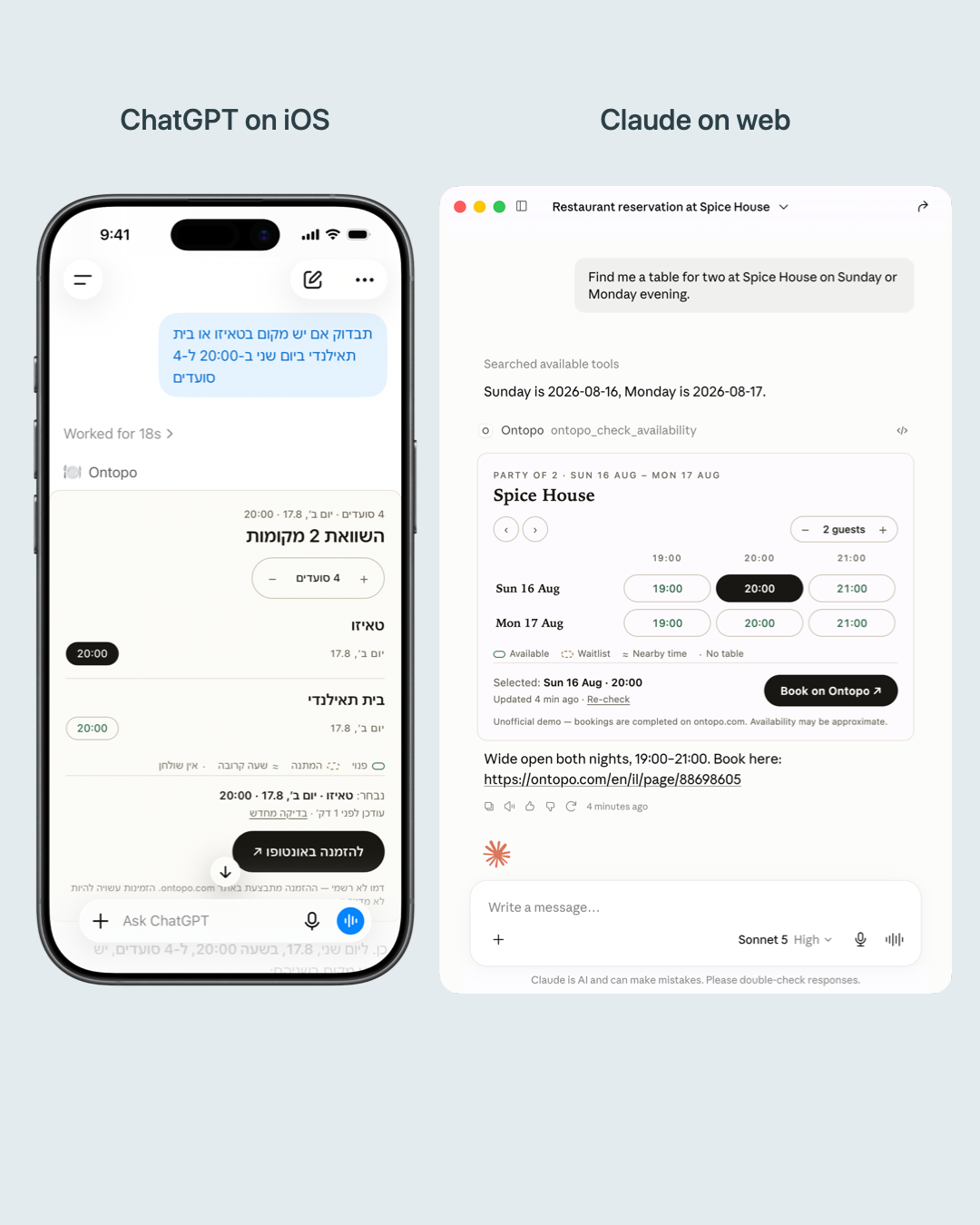
The next problem was getting the assistant to choose the right tool. My first MCP version could check a restaurant or a date, so I assumed it would combine those calls when I asked for a comparison. Sometimes it did. Other times it made a long series of calls and returned a pile of separate results.
I ended up making comparison a tool of its own. It accepts several restaurants and dates together, then returns the full set in one response. After that, ChatGPT and Claude returned the comparison in one go instead of trying to assemble it from many smaller calls.
The Agent Skill and command-line tool are public. I kept the hosted MCP server private, so people can see the demo but cannot connect to the server.
Agent readiness does not end with access
I had been thinking mostly about access: can an assistant reach the information, understand the request and return a reliable answer? The first version did that. It saved me from checking every date myself.
But finding the information is not the same as choosing a restaurant. I still want to compare the options, try a different party size, notice that one place only has a waitlist and decide which time works best. A text answer can be correct and still be awkward for that part.
It is easy to stop once the model can call the right API and return the right fields. But that is only part of the experience. For one restaurant and one date, text is probably the better answer. With several restaurants, dates and constraints, the presentation starts to matter. The same thing happens with flights, hotels and appointments.
The Ontopo tool still does a small job. The agent handles the repetitive search, I compare the results, and the booking stays on Ontopo.
The original posts
I first wrote about the skill in this February X thread. In August, I shared the MCP App demo on LinkedIn and X.